
Searching for and Blocking Destructive Content in Images
Received Date: September 06, 2025 Accepted Date: September 20, 2025 Published Date: September 25, 2025
doi: 10.17303/jist.2025.1.106
Citation: Larisa Cherkesova, Elena Revyakina (2025) Searching for and Blcxking Destructive Content in Images. J Inf Secur Technol 1: 1-11.
Abstract
Children and underage teenagers use the Internet not only for communication. so, for 2020, children aged five to seven years in half Of cases use the network to play online games, at the age Of eight to eleven years, this figure increases to 78%, and underage teenagers play online games in 80% of cases. According to the Ofcom article "Children and parents: media use and attitudes report 2020/21 ", already 30% of children under seven use messengers and social media applications. 93% use online video platforms such as YouTube, 33% watch streams, and 88% watch TV and use the video on demand system. The Older the children get, the greater the percentage Of them use the Internet. Thus, the issues Of protecting children from destructive information from the Internet are relevant. The article provides an analytical review Of modern software solutions for the protection of children and adolescents such as SafeKiddo Parental Control, mSpy, Kids Place, In addition, the description Of the developed software product is carried out, which allows detecting destructive content that can nega- tively affect children, as well as introducing new prohibited links and words
Keywords: Software Tools; Social Media Applications; SafeKiddo Parental Control
Introduction
In the modern world, it is incredible to imagine that once information was a resource that is difficult to get without leaving home. Now it's worth going online and all the news, any books and courses are in your pocket. Unlimited amount of information resources from text to video. Each user has to turn on their own "filter" to filter out useless and false information, which is enough on the network Every year there is a wider circle of children who are immersed in gadgets and the Internet from an early age. Being still small, defenseless and inexperienced, they do not know how to "filter" information like adults [1921. Vlhat is why children need protection from the influence that information can have until they learn to see the truth and calmly react to unpleasant things on the web. According to statistics provided by Joseph Johnson on Statis- ta about the most popular of online content between May 2020 and April 2021 almost 45% are video and audio content and 22% are social media. These statistics do not include mobile devices, which children use all the time. Most teenagers now have the Internet at any point in their lives, so they can spend an infinite amount of time on their mobile device 13,41.
In Russia, most children use the Internet uncontrolla. bly. The probability of finding unacceptable content on the net. work that can harm health, and maybe life, is high. That is why there is a need to protect the child from possible negative inv pacts, even if he uses the Internet without parental control.
Materials and Methods
Overview Of software tools for restricting accessSafeKid- do Parental ControlSafeKiddo Parental Control is a mobile device app that gives parents the ability to monitor their child's activity by synchronizing their device and phone. Using SafeKiddo Parental Control, parents can [5]:
- Block Wi-Fi and mobile internet on your child's phone for a certain period of time so that he or she has no access to the web;
- Keep track of shopping in the shop with apps and see which ones your child installs on the phone;
- Prohibit or permit the use of an application;
- Set up a 'safe search' function on Google and YouTube that allows you to display videos and web pages with options that are completely suitable for children;
- View reports on internet activity, with real-time and historical views of activities available.
'Ihe app works by connecting to a Wi-Fi network - ei- ther home or public. Among the disadvantages - it can provoke severe smartphone "hang-ups", is only available in English and only for Apple.
MSpy is an application of foreign developers, unfor- tunately, without access to the Russian language. For users who know English, using the application will not be difficult. The pa. rental control includes the following functions and features:
1. Control of calls via parental account, calls, contact list -list parents can fully control all calls made with call duration and see the contacts added; control of SMS messages, social media messages with full text and correspondence history The parent can fully monitor all calls made, call duration and see all added contacts; control SMS messages, social media messages with full text and conversation history;
2. Permission to download and install parent-specified apps and games.What's more, the parental controls include geo-track- ing of the smartphone, and a phone search function in case of loss; if stolen, all data can be easily locked so that no personal information is leaked. The parent also sees a report on the use of the phone and all apps internet browser, gallery, calendar, etc. There is a charge for this software [6, 7].
Kids Place, which means "Children's Space", is a soft. ware application that operates in foreign countries. In the Rus- Sian Federation, the application is active, but there is no Russian version of this program is not available yet. In terms of function- ality, Kids place allows parents to be confident that their child will not charge their phone to pay for any gocxls, services or apps, such as through the App Market.
This will all be fully monitored and blocked by the soft- ware. In addition, it is possible to lock absolutely all buttons on the smartphone as you want so that the child stays only in the Kids Place without making outside calls, texting, or accessing the Internet. At any time, a parent can disconnect their child from connected networks to block the use of Internet traffic. The prod. uct has a free version, but many functions are rendered unavaiL able due to this. The app also uses quite a lot of power, and the child's hone m run out of power quickly
Kaspersky is known to all as the developer ofone of the most important anti-viruses. However, Kaspersky Total Security also offers parental control software as part of its products. Ihe parental control feature allows the user to create a block list or a "white list* of websites. In this way, it is possible to completely limit access to the Internet, leaving only the sites your child can use for homework or learning.
It is also possible to set the time of use or stay on the Internet, for example with a weekly schedule. The control can be installed on a smartphone and a computer at the same time, but Kaspersky is not recommended for use on low-end models of phones and computers. This is because the software consumes a lot of energy for its operation, so gadgets can quickly become unusable. Another function of parental controls is social media monitoring. A parent can block suspicious communication with any contacts.
Likewise, parents are encouraged to use Safe Kids in. stead of parental controls. This feature allows them to monitor their children's online activities and make sure they are protected online. There is a charge for this application.
KidLogger is based on the Android operating system, and there are paid and free versions. The application and website are russified and technical support in Russian is available at any time. The program can be used discreetly from the child in the version, as a spy program, which has the function of moni. toring the child by geopositioning [8].
in its basic, free version, provides a report of all the actions of a child on the Internet the pages visited and the time spent by the child on the page. "Ibis data can be mon- itored by parents from any of their own devices, be it a phone, tablet or computer. Ihe software is also a kind of timer for the child's use of the smartphone [9,10].
Parents can choose three-time ranges in which the child is allowed to use certain apps, or not allowed to use the device at all; there are also free times when the child can use any apps, but only for a certain amount of time. At night the phone will be lxked. Any app that is suspicious or disapproved of by a parent will be blocked from installation. Attempts to remove the app or make any changes to the child's device will not be possible with. out parental consent.
Description Of the software development processBrowser extensions are small programs that custom. ize the Internet experience. They allow users to customize the functionality and behaviour of web browsers in different ways. Browser extensions are created using HTML, JavaScript and CSS scripts and are small websites downloaded to the web browser shop.
The main file manifest.json tells the browser important information about the extension, such as its name and the neces- sary permissions. Figure I shows the code of manifest.json of the developed software.
The file starts with the manifest version, the name and description of the extension, and the version of the extension, which can be changed during updates. 'Ihe content script points to the files used in the extension. In a developed application, a special template matches any URL starting with a re- solved scheme. 'Ihe extension uses a file written in JavaScript and a written popup-html file to operate and communicate with the server, which contains the parent's personal account login.
The activeTab permission gives the extension tempo• rary access to the currently active tab when the user calls the extension, Access to the tab is retained while the user is on that page and blocked when the user closes the tab or the browser [10]. "Ihe manifest file uses an image to indicate the extension. "Ihe icon does not attract the child's attention because its appear. ance is similar to a normal setting.
Its elements are: a browser extension installed on the child's computer; sewer; a parent's private office.
A block diagram of the developed extension's algorithm is shown in Figure 2.
Results and Discussion
Main program functionsThe JavaScript running in the client-side extension has five functions, showCover() receives an integer number from 0 to 2 as input. The contents of the function are shown in Figure 3, According to the data received, the web page closes with a mono. chrome background, if the value is O, or opens, if the value is I , or goes to the Yandex home page, if the value is 2.
The ready () function, shown in Figure 4, reads the images on the current page and calls api() to send the data to the server. Api() uses the XMLHttpRequest method, which is a built in browser object that allows HTTP requests to be made to the server without reloading the open page.
This method also uses the apiForChekLink() function, which sends a page link to the server to check if it is on the white and black lists. apiForChekLink(). This function is called by chekLinks(), where the current page link is found using the doc. ument.location.href property and passed to apiForChekLink().
The server part is written in the Python programming language. To interact with the client, FastAPI is used, which is a modern high-performance web framework.
The lists() function is used to check if the received link is in the whitelist or blacklist and receives the link itself from the client. This function and the methods it contains are shown in Figure 5 as a screenshot from the program. The list files are read using the csv.reader() method, and then it checks if the received link is in the list
The list_of_images() function calls two functions: download() and takes an image reference as input, then creates a file name from its reference, opens and writes the image to the file.
Chek() checks the images themselves. It is shown in Figure 6. Since many images from the Internet have the extensions. webp and. svg, which are not suitable for checking, such files are converted to .jpg and .png. This is done using the PIL library, in the first case by using the Image.open method to con. vert the image to rgb, and then saving it as a .jpg. In the second case, the svg2rlg tool is used to convert the. svg into a reportlab graphic, and the renderPM.drawToFile() method is used to ren- der the image into ,png format, After all conversions, the search_ and_block() method is called with the image as input.
The method calls the written methods to detect weapons, erotica, and text with unacceptable words on the image. 'Ibis method is shown in Figure 7. Weapons are searched using a trained neural network created by Olmos R., Tabic S. and Herrera F. in 2018 [81. It checks whether an image contains a knife, a gun or an assault rifle. To detect erotica, the nudenet library is used to detect naked bcÆy parts in the im- age. If something is found, it returns True. Text from the image is read from the image using the pytesseract library, and then a check is made to see if there are any invalid words in the text of the image.
After checking the images, they are removed from the folder on the server with the delete_img() method The addlink() and addwrd() functions get a link and a word or phrase, respectively, from the client. An example of the addlink code is shown in Figure 8. These functions add to the blacklist and the list of banned words.
The verify() function, shown in Figure 9, gets the user- name and password and checks if they exist in the .csv file. If it is found, it will take the user to the page with the parents' personal account, if not, nothing will happen and the user will stay on the same page where he was.
When the server loads, ifany data is stored in the image download folder, it will be deleted.
Description of the work of the developed softwareFor visual testing of the modules of the developed extension,several existing sites on the Internet were selected. When this page was loaded, it was covered by a white background. The text shown in Figure 10 was read from the image. The words from it were checked with a dictionary and then, having found a match, the page was transferred to the Yandex homepage.
Testing of the operation of the weapon recognition module in the image place on a news resource, namely, an article about the Kazan shooter was used.
On the server side, during the image check, the results of the check were displayed. These results are shown in Figure 11. As soon as a weapon is detected, the module stops working and the extension is notified that the resource contains inappropriate content.
The presence of erotica in images on the Internet was checked on the popular website PornHub by searching for it in a search engine and clicking on the first link. The result of checking the next picture on the page is the result shown in Figure 12, which takes the user to the Yandex homepage.
To log in to your personal account, click on the exten. Sion icon on any tab. After entering the username and password, the user is checked by the server. If everything is correct, the pri. vate office page opens. After logging in, parents can add a link and a word or phrase in the boxes.
Figures 13 and 14 show the reference and word dictionaries where, when added by the parents, new values will be added.
Parents enter a link or word in the boxes as shown in Figure 15 and then click the "Submit" button.
After sending, the server received the data and the functions wrote everything to the files. 'Ibis is demonstrated in figures 16 and 17.
All modules of the developed browser extension were shown in this way. The extension detects destructive content that can negatively affect children and also allows parents to enter new banned links and words.
Conclusion
The Internet has long been part of everyone's life. Every child now has the opportunity to use it. Despite the many oppor- tunities the Internet offers, it also poses many dangers, especial. ly to children. The question therefore arises as to how to ensure their safety while using the net. Increasingly children are using the Internet uncontrollably and this can be detrimental to their health and development, Illis use of the Internet poses many risks, which is why it is necessary to ensure the safety of children and young people online.
- Levchenko AO (2015) Children online: dangers on the net // Eksmo Publishing House 160.
- Efimova LL (2017) Information security of children.2. Russian and foreign experience // Unity-Dana Publishing House 240.
- Flanagan D (2013) JavaScript. Detailed guide, 6th edition // Publishing House Symbol-Plus 1080.
- Dawson M (2018) Programming in Python // Peter Publishing House 416.
- Spizhevoy A, Rybnikov A (2018) opentsv 3 Computer Vision with Python Cookbook. Leverage the power of OpenCV 3 and Python to build computer vision applications // Packt Publishing 306.
- Julie A, Pal S (2018) Keras Library a deep learning tool // DMK Press 294.
- Bliznyuk BO (2017) Modern methods of natural Ian. guage processing // Bulletin of the Kharkiv National University. Karazina- The series "Mathematical modeling. Information tech. nology. Automated control systems 36: 14-26.
- Junyang B, Weiping W, Mingming L, Haodong W, Ji- anxin W (2016) TD.WS: athreatdetectiontool ofWebSocket and WebStorage in HTML5w // Security and Communication Net. works 9: 5432-43.
- Jessey B (2017) Decrypting TIS, Capturing USB, Key- loggers. and Network Graphing // Wireshark• for Security Pro- fessionals: Using Wireshark and the Metasploit• Framework
- Field C (2017) Natural Language Processing // The Data Science Handbook.
- Kovtun Y, Cherckesova L, Revyakina E, Safaryan O, Ro. shchina E et al. (2022) Methodology for neural networks train. ing at analyzing the context of event at emotions recognizing // Robotics, Machinery and Engineering Technology for Precision Agriculture. Proceedings of XIV International Scientific Confer- ence "INTERAGROMASH 2021", Cep- "Smart Innovation, Sys- tems and Technologies" Singapore 65-71,
- Korochentsev IDA, C herckesova IN, Revyakina EA, Goncharov RA (2021) Investigation of the application of soft- ware generator of the speech-like interference to protect acoustic information from leakage through an acoustic channel Journal of Physics: Conference link is disabled 2131.
FIGURE 1
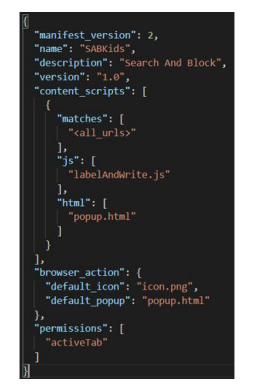
Figure 1: Code for the manifest.json file
FIGURE 2
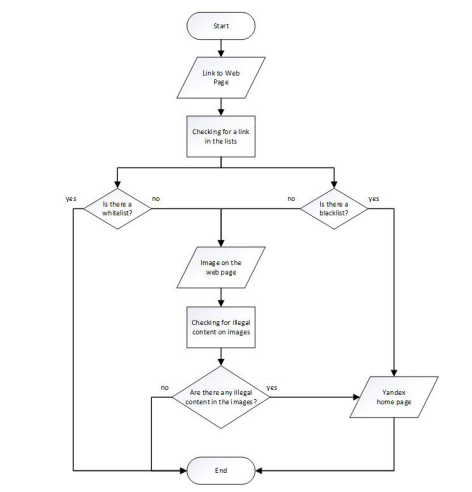
Figure 2: Block diagram of extension operation
FIGURE 3
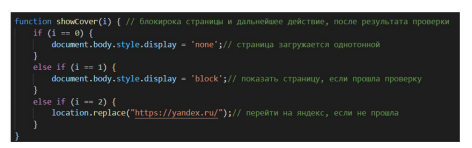
Figure 3: Function showCover()
FIGURE 4
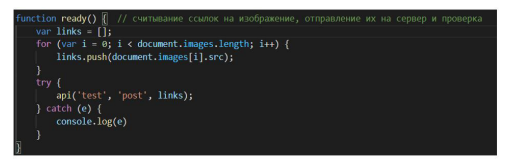
Figure 4: Function ready()
FIGURE 5
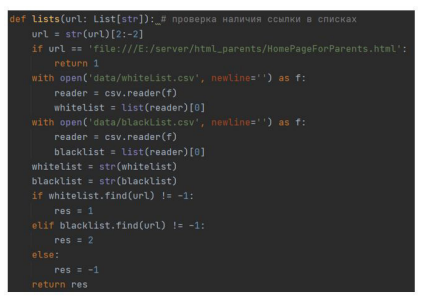
Figure 5: Function lists ()
FIGURE 6
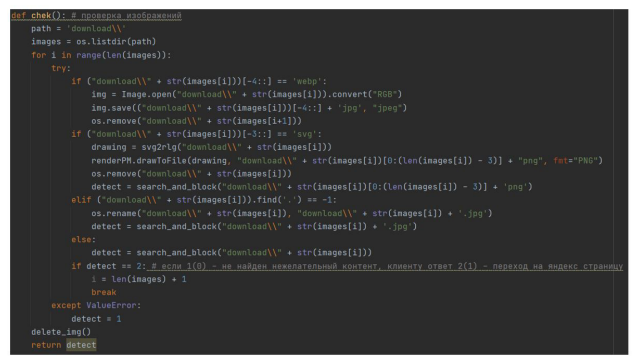
Figure 6: Function chek()
FIGURE 7
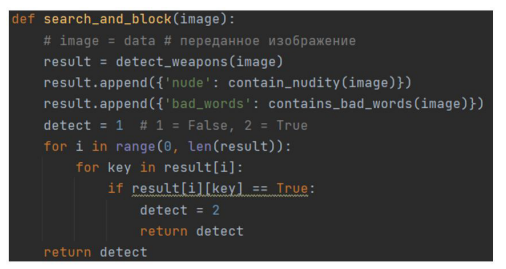
Figure 7: Function search_and_block()
FIGURE 8
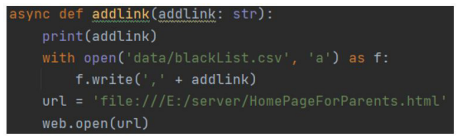
Figure 8: Function addlink()
FIGURE 9
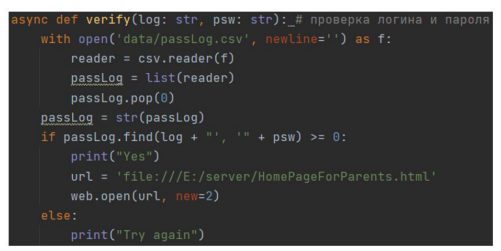
Figure 9: Function verify()
FIGURE 10

Figure 10: Text recognized in the image
FIGURE 11

Figure 11: Result of checking images for weapons
FIGURE 12

Figure 12: Result of the Erotic Search module on images
FIGURE 13

Figure 13: Banned links dictionary
FIGURE 14

Figure 14: Prohibited word dictionary
FIGURE 15

Figure 15: Entering forbidden references and words to add to dictionaries
FIGURE 16
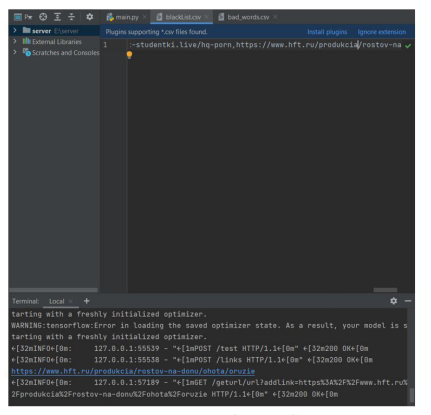
Figure 16: v,Vriting a reference to a file
FIGURE 17
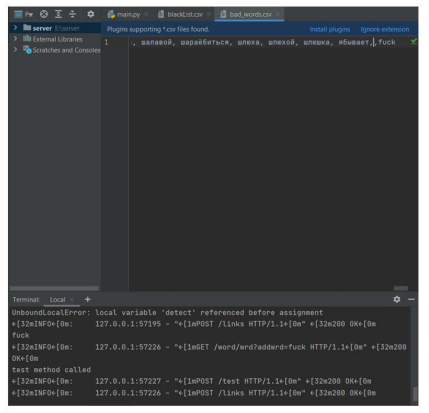
Figure 17: Writing a word to a file
Figures at a glance